
Can I Use IPTV Without a Cable Box? Everything You Need to Know in 2026
Cable boxes are dying. The question most people are now asking is not whether to replace them — it is what to replace them with. The answer, in almost every case, is IPTV without a cable box.
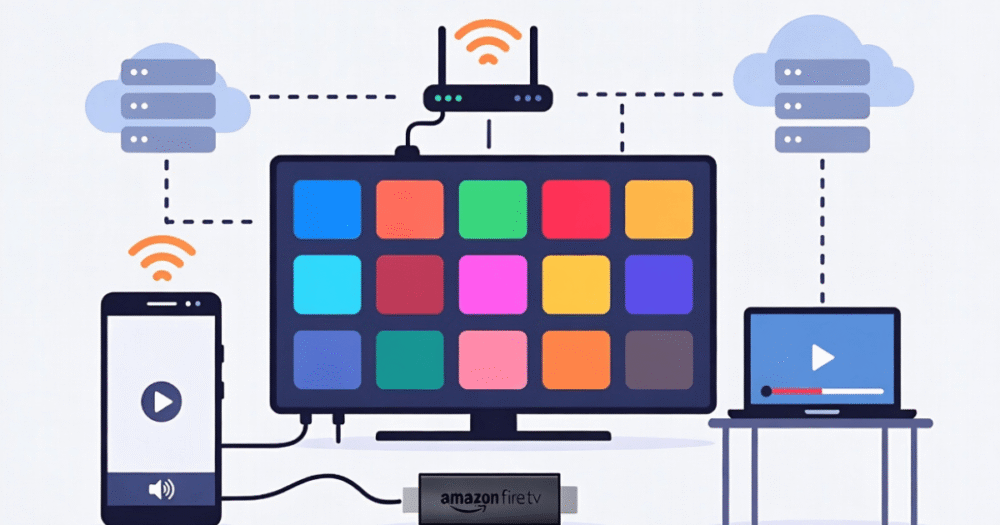
IPTV — Internet Protocol Television — delivers live channels, on-demand content, and premium sports streams directly over your internet connection. No coaxial cable. No dish. No hardware rental fee paid to a broadcaster indefinitely. The signal comes through your router, and practically any screen in your home can receive it with the right setup.
This guide covers every device option, the technical requirements that actually matter, where resellers run into device-related support issues, and what separates a smooth IPTV without a cable box experience from a buffering nightmare. If you are a household subscriber setting up for the first time or a reseller advising customers on hardware, this is the operational breakdown you need.
Why IPTV Without a Cable Box Is Now the Default Setup
The infrastructure shift has been permanent. In 2026, the majority of new IPTV subscribers never touch a cable box at all. The devices available for IPTV playback have become powerful enough that dedicated broadcast hardware adds cost and complexity without adding value.
Traditional cable boxes were necessary because the signal required hardware decryption and tuning. IPTV streams over HLS or Xtream Codes protocols do not need that hardware layer. The decoding happens in software — inside a Smart TV app, a streaming stick processor, or an Android box running a dedicated player.
What this means practically is that a household already owning a Smart TV, a streaming stick, or a mid-range Android device is already equipped to run IPTV without a cable box today, with zero additional hardware cost. The only genuine requirement is a stable internet connection and a subscription from a provider with proper load balancing and backup uplink servers.
Pro Tip: The most common setup mistake new subscribers make is assuming their internet speed is the primary variable. Connection stability matters more than raw speed. A 30Mbps stable connection outperforms a 100Mbps connection with packet loss every time when it comes to live stream quality.
Every Device That Runs IPTV Without a Cable Box in 2026
The device options have expanded considerably. Understanding which category fits your setup — and your customers’ setups if you are a reseller — prevents the majority of avoidable support conversations.
Smart TVs are the cleanest solution for household subscribers. Samsung, LG, and Android TV-based sets all support IPTV apps natively. The most common players — IPTV Smarters Pro, TiviMate, and GSE Smart IPTV — are available directly from manufacturer app stores on most current models.
Amazon Firestick remains the most widely deployed IPTV device in the UK market. Its accessibility, price point, and sideloading capability make it the default recommendation for new subscribers. The 4K Max variant handles high-bitrate 4K streams without the processing bottlenecks seen on older Firestick generations.
Android TV Boxes offer the most flexibility and are preferred by technically comfortable users and resellers testing their own panels. Full Android OS access means any player can be installed, codec support is broader, and hardware specs can be matched to stream quality requirements.
iOS and Android Phones and Tablets work effectively for mobile viewing. IPTV without a cable box extends naturally to mobile devices — the same M3U credentials that activate a TV setup work on a phone player simultaneously, subject to the connection limit set by your provider.
Windows and Mac computers via VLC, IPTV Smarters desktop, or browser-based players round out the device picture for users who want flexibility across working environments.
The Connection Requirements That Actually Determine Stream Quality
Device compatibility handles one side of the equation. Connection quality handles the other. IPTV without a cable box performs exactly as well as the network delivering the stream — and most buffering issues that resellers get blamed for are actually network-side.
| Connection Type | Stability | Recommended For | Risk Factor |
|---|---|---|---|
| Wired Ethernet (home) | Excellent | 4K streams, consistent viewing | Very Low |
| 5GHz Wi-Fi (close range) | Very Good | HD and FHD streams | Low |
| 2.4GHz Wi-Fi (standard) | Variable | HD streams only | Medium |
| Mobile Data (4G/5G) | Variable | Short sessions, not live sport | Medium–High |
| Shared public Wi-Fi | Poor | Not recommended | Very High |
The practical recommendation for any subscriber experiencing buffering on a capable device is to test a wired connection before raising a support ticket. The number of support issues that resolve immediately on a cable switch is significant enough that it belongs in every reseller’s first-response troubleshooting script.
How IPTV App Choice Affects Performance Without a Cable Box
Not all IPTV players are equal, and the app layer introduces its own variables that are entirely separate from stream quality or device capability. This is a dimension most setup guides skip entirely.
Different players handle HLS latency differently. TiviMate on Android is widely considered the most efficient player for live streams because its buffer management is more aggressive than most alternatives — it fills the playback buffer faster at stream start and recovers more quickly from momentary packet loss. IPTV Smarters Pro handles the Xtream Codes API more cleanly than generic M3U players, which matters when your provider’s panel uses Xtream authentication rather than a raw playlist URL.
The app also determines EPG rendering quality. A player that cannot properly parse the provider’s EPG feed will show blank guide data regardless of how accurate the underlying EPG is. This creates a false impression of a provider problem when it is actually a player configuration issue — and it generates unnecessary support conversations for resellers who have not briefed their customers on app settings.
Pro Tip: For resellers onboarding new customers, standardise on a single recommended player per device type. Offering customers three different app options creates three different support surfaces. One app, one setup guide, one support script — that structure cuts device-related complaints by a measurable margin.
Why Resellers Face More Device-Related Issues Than Direct Subscribers
Resellers manage a customer base across a wide range of devices, technical skill levels, and home network configurations. This diversity creates a support surface that direct subscribers never encounter, and it requires a different operational approach.
The most common device-related issues resellers field are not infrastructure problems — they are configuration problems on the customer’s end that present as stream failures. A customer on a 2019 Firestick running an outdated player version complaining of buffering is not experiencing a server issue. A customer on 2.4GHz Wi-Fi in a congested building with ten neighbouring networks competing on the same channel is not experiencing a DNS poisoning event. Distinguishing between these scenarios quickly is what separates professional resellers from those drowning in support tickets.
Understanding the full operational picture of how a reseller panel works is essential before scaling a customer base across mixed device environments. Reviewing how IPTV reseller panel works gives resellers the infrastructure context needed to trace issues accurately rather than defaulting to upstream blame every time.
Setting Up IPTV Without a Cable Box: The Actual Process
The setup process is straightforward across all major device categories. The steps below apply regardless of device type — the variables are the player app name and where it is installed from.
- Step 1 — Obtain your IPTV credentials — Your provider supplies either an M3U URL or Xtream Codes login (server URL, username, password). Confirm which format your chosen player accepts before installation.
- Step 2 — Install your IPTV player — For Firestick, use the Downloader app for sideloading if the player is not in the Amazon store. For Android TV and Smart TVs, install directly from the respective app store where available.
- Step 3 — Enter credentials and load the playlist — In the player settings, input your M3U URL or Xtream Codes details exactly as provided. One character error in the server URL or password will produce an authentication failure that looks like a stream error.
- Step 4 — Configure EPG — Input the EPG URL from your provider separately if the player does not pull it automatically from your Xtream Codes connection. Allow the EPG up to 15 minutes to populate on first load.
- Step 5 — Test under load — Play a live channel during an active broadcast period. Switch between standard definition and high definition streams to confirm both quality tiers load without HLS latency issues.
Providers offering properly structured IPTV services include setup guidance as part of their onboarding — this is a useful baseline expectation when evaluating new providers.
ISP Blocking and IPTV Without a Cable Box in 2026
Running IPTV without a cable box means your stream traffic travels entirely over your broadband connection — which makes it visible to ISP-level traffic analysis tools in ways that cable or satellite signals never were. This is the enforcement dimension that most device guides ignore entirely.
In 2026, AI-driven ISP analysis tools can identify IPTV stream patterns by their traffic signatures — high-bitrate HLS streams hitting consistent endpoints at regular intervals, combined with EPG data requests and Xtream API authentication calls. This pattern is increasingly being used by ISPs acting on broadcaster pressure to throttle or redirect specific traffic types.
The practical impact for subscribers is that stream quality may degrade at specific times — particularly during major live events — regardless of provider infrastructure quality. The mitigation options available at the device level include changing DNS settings on the router or device (moving away from the default ISP-provided DNS), using a VPN configured specifically for streaming traffic, and connecting via a mobile hotspot on a different network to isolate whether the issue is ISP-specific.
Resellers who understand this dynamic can address complaints accurately rather than raising unnecessary infrastructure tickets with their upstream provider. Network-level blocking requires a network-level fix — not a server restart.
IPTV Without a Cable Box for Families: Multi-Device Management
Household subscribers running IPTV without a cable box across multiple rooms face a specific operational challenge: connection limits. Most subscriptions allow a defined number of simultaneous streams — typically one or two per active line. A family of four wanting IPTV on three TVs and a tablet simultaneously needs either multiple lines or a provider who explicitly supports multi-connection plans.
Resellers serving family customers need to establish this conversation at the point of sale rather than after the first complaint. A customer who purchases a single-line subscription expecting four-screen access generates an immediate churn risk when the connection limit is hit. Setting accurate expectations upfront — and offering the appropriate multi-line package — protects both customer satisfaction and reseller reputation.
Providers built for household and reseller scale — with proper load balancing infrastructure and transparent multi-connection options — are documented through the broader IPTV services ecosystem. For UK-based resellers specifically, panel structures supporting family customer management are detailed at britishseller.co.uk IPTV reseller plans.
Frequently Asked Questions
Can I use IPTV without a cable box on a basic Smart TV?
Yes. Most Smart TVs manufactured after 2018 support IPTV player apps directly from their app store. Samsung Tizen, LG webOS, and Android TV-based sets all have compatible players available. If your specific TV model does not support a dedicated IPTV app, a £30–£50 streaming stick connected via HDMI delivers identical functionality on any screen with an HDMI port.
What internet speed do I need for IPTV without a cable box?
Speed is less critical than stability. A minimum of 10Mbps supports HD streaming reliably. 4K streams require 25–35Mbps consistent throughput. The more important variable is packet loss and connection jitter — a stable 25Mbps wired connection delivers better IPTV performance than an unstable 100Mbps Wi-Fi signal. Always test with a wired connection before attributing buffering to provider infrastructure.
Can I use IPTV without a cable box on multiple TVs in the same house?
Yes, but each simultaneous stream typically requires a separate active line. Most standard subscriptions allow one or two concurrent connections. For families wanting three or more screens active at the same time, discuss multi-line options with your provider before purchasing. Resellers should clarify this at the point of sale — connection limit complaints are the leading cause of first-week churn in household subscriptions.
Why does my IPTV buffer on a good device without a cable box?
Buffering on a capable device is almost always a network issue rather than a provider problem. Check whether you are on 2.4GHz versus 5GHz Wi-Fi, test with a wired ethernet connection, and confirm no other high-bandwidth activity is running on the same network simultaneously. If buffering persists only during specific times or on specific channels, ISP-level traffic throttling at the network level is a more likely cause than server infrastructure failure.
Is IPTV without a cable box legal to set up and use?
The device setup itself — installing a player app and connecting it to a stream source — is entirely legal. The legality question relates to the content being streamed and whether the provider has appropriate licensing for what they deliver. The hardware configuration involving no cable box is not a legal variable. Subscribers should satisfy themselves regarding their provider’s legitimacy independently of the device setup question.
How does IPTV without a cable box handle channel guide data?
EPG — Electronic Program Guide — is delivered separately from the stream itself, typically via an XML data feed provided by your IPTV service. Most dedicated players pull EPG automatically when configured with Xtream Codes credentials. If EPG shows blank or incorrect data, the issue is usually a player configuration error or an incompatible EPG URL format rather than missing guide data on the provider’s side.
As a reseller, should I recommend one device type for all my IPTV customers?
Standardising on one or two recommended devices significantly reduces your support burden. Amazon Firestick covers the majority of household use cases and has the widest setup documentation available. Android boxes suit technically comfortable users who want more control. Avoid recommending older generation devices — processing bottlenecks on outdated hardware generate support tickets that have nothing to do with your upstream infrastructure.
Can IPTV without a cable box be affected by ISP blocking?
Yes. In 2026, AI-driven ISP analysis tools can detect and throttle IPTV stream traffic patterns at the network level. This affects the viewing experience regardless of provider quality or device capability. The mitigation options at device level include changing DNS settings away from ISP defaults, using a VPN configured for streaming, or testing on a mobile data connection to determine whether the issue is ISP-specific rather than provider-side.
IPTV Without a Cable Box: Reseller Setup and Customer Management Checklist
Device Standardisation
- Choose one primary recommended device per customer tier — Firestick for standard households, Android box for advanced users
- Maintain a tested setup guide for each recommended device — one guide per device, updated when player apps release major version changes
- Avoid recommending devices older than three years — processing limitations on legacy hardware create avoidable support conversations
Customer Onboarding
- Clarify connection limits at point of sale — single-line versus multi-line requirements for family households
- Confirm which player app the customer will use before activation — send credentials in the format that player accepts (M3U or Xtream Codes)
- Include EPG configuration steps explicitly — blank guide data is the most common first-day complaint and is almost always a setup issue
Troubleshooting Protocol
- Build a network-first troubleshooting script — wired test before any infrastructure escalation
- Include ISP blocking diagnostic step — mobile hotspot test isolates ISP throttling from provider-side issues
- Document DNS change instructions for common router models used by your customer base
Scaling Considerations
- As your panel grows past 30 active lines, audit the device mix across your customer base — mixed device environments generate disproportionate support volume
- Identify which customers are on legacy devices and proactively recommend upgrades before they become churn events
- Review the full scope of IPTV services available from established providers to ensure your upstream infrastructure can handle multi-device household loads as you scale