

The 2026 Guide to Watching World Sports on UK IPTV
If you have ever tried juggling four different apps just to catch a football match, a cricket session, and a late-night fight card, you already understand the appeal of UK IPTV for sports fans. A single UK IPTV subscription can pull together football, cricket, rugby, tennis and combat sports into one interface, which is exactly why so many households are switching away from stacking multiple streaming subscriptions. For resellers, this same demand is the single biggest driver of new sign-ups every season. This guide breaks down how UK IPTV handles world sports coverage, and how sub-resellers can position sports-heavy packages without overpromising.
Why UK IPTV Has Become the Default Choice for Sports Households
Traditional satellite packages force fans to pay for regional sports tiers that rarely include everything they actually want. UK IPTV works differently because the panel structure allows a provider to bundle football, cricket, and niche sports feeds under one EPG, so the household never needs to switch boxes or apps mid-match. This matters most during overlapping fixture windows, when a cricket session and a football kickoff run at the same time and a family needs two screens active without the service choking on concurrent streams.
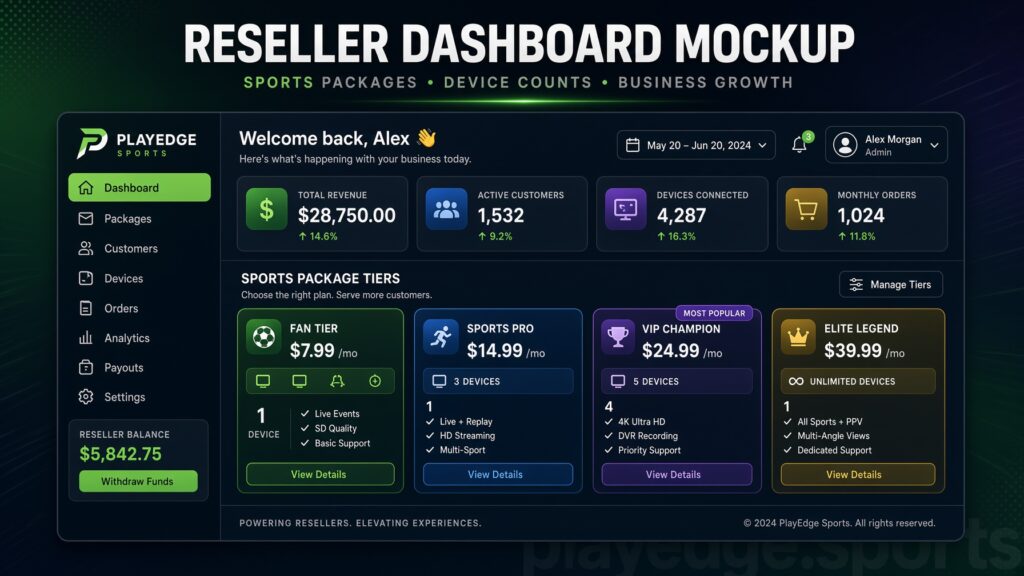
The other driver is flexibility around device count. A UK IPTV subscription typically supports multiple connections tied to one panel credit, which suits households where one person watches football on a Smart TV while another follows cricket on a tablet in another room. Resellers who understand this dual-device pattern price their sports-focused packages accordingly, rather than applying a flat single-device rate that undersells the actual usage pattern.
Pro Tip: Never advertise “unlimited devices” on a sports package. Cap it explicitly (2–4 connections) and state it upfront, this single change cuts refund requests dramatically during high-traffic weekends.
The Real Reason Football Streams Buffer During Big Matches
Buffering during a major football fixture is rarely about the subscriber’s home broadband. In most cases it traces back to upstream server load, not the household’s connection. When thousands of concurrent viewers hit the same channel feed simultaneously, a provider without proper load balancing across multiple servers will see HLS latency spike, and the stream degrades exactly when demand is highest.
This is where backup uplink servers become non-negotiable rather than optional infrastructure. A single-server setup might handle a quiet Tuesday cricket session without issue, but the same setup will fail during a high-demand football weekend unless there is a secondary uplink ready to absorb overflow traffic. Resellers who source panels from providers without documented failover capacity are the ones fielding angry messages mid-match, and by then it is too late to fix anything.
DNS poisoning attempts also spike around major sporting events, since this is when ISPs are most actively monitoring traffic patterns for enforcement. A provider with rotating server IPs and resilient DNS handling keeps a sports package watchable even as ISP-level blocking attempts increase during tournament season.
Cricket Coverage: The Overlooked Infrastructure Challenge
Cricket presents a different technical problem than football. A single match can run for six to eight hours, which means the server load is sustained rather than a short concurrent spike. This sustained load exposes weak infrastructure in a way that a 90-minute football match never will, because a server that copes fine with short bursts can still overheat or drop connections three hours into a long session.
For subscribers, this means checking whether a UK IPTV package promotes multi-day match stability, not just single-event reliability. For resellers, it means panel credits allocated to cricket-heavy households should factor in longer average session length when calculating server capacity per credit.
- Compare providers on sustained-session stability, not just peak-load handling
- Ask specifically about server behavior during 6+ hour continuous streams
- Test EPG accuracy for cricket, since session times shift constantly and a stale guide frustrates subscribers fast
- Confirm whether the panel supports mid-session server switching without a channel restart
Pro Tip: Run your own 4-hour test stream on a cricket feed before reselling it as a flagship package. Providers happy to demo short bursts often go quiet when asked for a multi-hour trial.

Combat Sports, Rugby, and the “Beyond” in World Sports IPTV
Football and cricket dominate the conversation, but combat sports events and rugby fixtures are where sub-reseller margins often improve, since fewer providers compete aggressively in this niche. These events tend to be shorter than cricket but carry unpredictable concurrent spikes similar to football, particularly during marquee fight nights.
The technical requirement here is EPG precision. Combat sports schedules shift more than any other category, with start-time delays common. A UK IPTV package that pulls EPG data from a single unreliable source will show subscribers the wrong start time repeatedly, which erodes trust faster than an actual buffering incident. Providers who cross-reference EPG data from two or more sources catch these discrepancies before subscribers do.
Rugby, meanwhile, benefits from the same dual-device household pattern seen in football and cricket. Sub-resellers targeting rugby-following households should bundle it alongside football rather than positioning it as a standalone niche package, since the infrastructure demands overlap closely enough that separate panel credits rarely make commercial sense.
Comparison: Basic Sports Package vs Premium Multi-Sport Infrastructure
| Factor | Basic Sports Package | Premium Multi-Sport Setup |
|---|---|---|
| Server redundancy | Single server, no failover | Multiple servers with backup uplink |
| EPG accuracy | Single-source, often delayed | Cross-referenced, near real-time |
| Concurrent device support | 1 device per credit | 2–4 devices per credit |
| Cricket session stability | Degrades after 2–3 hours | Stable across full match length |
| DNS resilience | Fixed IP, vulnerable to blocking | Rotating IPs, poisoning-resistant |
How Sub-Resellers Should Price World Sports Packages
Pricing a sports-heavy IPTV package purely on channel count is a common mistake. The real cost driver is concurrent load during peak fixtures, not the raw number of sports channels listed. A sub-reseller buying panel credits at a flat rate needs to account for the fact that a football-and-cricket household will strain infrastructure far more than a household watching a handful of entertainment channels.
A more sustainable pricing model separates households into tiers based on expected concurrent usage rather than channel count alone. A single-device cricket-only subscriber costs the reseller far less in server strain than a household running football and cricket simultaneously across two devices. Building this distinction into pricing protects margins during the exact weekends when demand — and therefore server cost — is highest.
Churn psychology also plays a role here. Sports subscribers churn fastest immediately after a bad-experience match, not gradually over time. A single buffering incident during a final or a major fixture can trigger a cancellation within days, which makes proactive server monitoring during known high-demand windows far more valuable than reactive customer support after complaints start.
What to Check Before Reselling a World Sports IPTV Package
Before committing to a panel provider for a sports-focused reseller business, verify the technical claims rather than trusting the sales pitch. Ask directly about server count, backup uplink capacity, and how EPG data is sourced. Providers who answer vaguely on any of these three points are the ones most likely to leave you managing refund requests during the exact weekends you expected the most revenue.
Testing with a real household setup, ideally across two devices watching different sports simultaneously, gives a far more honest picture than a single-device trial. This mirrors how actual subscribers use the service and exposes concurrent-load weaknesses that a solo test never reveals. Reviewing IPTV services documentation on panel structure is a useful starting point for resellers building out a sports-tier package for the first time, particularly around how credits map to device limits.
Setting Up a Household for Multi-Sport Viewing
Getting a UK IPTV subscription optimized for football, cricket, and other world sports is mostly about matching the app to the device correctly rather than chasing extra features. Smart TVs, Firestick, and Android boxes each handle multi-hour cricket sessions slightly differently, and picking the wrong app for a given device is the most common self-inflicted buffering complaint.
- Match the IPTV app to your primary device (Firestick, Android TV, or Smart TV native app) rather than using a generic player across all devices
- Keep one device dedicated to long-session sports like cricket, and a second free for shorter football or combat sports fixtures
- Restart the app fully between long sessions rather than leaving it running for days, since cached EPG data can go stale
- Check the IPTV services page for device-specific setup notes before assuming a generic configuration will work
Pro Tip: If a household reports buffering only during football but never during cricket, the issue is almost always concurrent load on the provider’s side, not the home network. Isolate the pattern before troubleshooting the router.
For resellers explaining this to less technical subscribers, framing it simply as “match the app to the box, not the other way round” tends to resolve most support tickets without needing a deeper technical explanation. Sub-resellers can also reference how how IPTV reseller panels work to better explain credit-to-device relationships when a household asks why their package covers a specific number of screens.
2026 Trends Reshaping World Sports Streaming on IPTV
AI-driven ISP blocking has become noticeably more adaptive through 2026, moving well past simple domain blacklists into pattern-based detection of streaming traffic itself. This shift means UK IPTV providers relying purely on static server IPs are getting flagged faster than in previous years, which pushes serious operators toward rotating infrastructure and smarter routing as a baseline requirement rather than an advanced feature.
On the viewing side, demand for combined football-and-cricket households has grown as more UK-based cricket-following families also follow domestic and European football, making dual-sport packages more commercially relevant than single-sport tiers. Providers and resellers who built rigid single-category packages are having to restructure around this blended demand pattern.
Server-side, the gap between operators running genuine backup uplink infrastructure and those running single-server setups has become far more visible to subscribers, since major fixtures now generate visible social media complaints in real time when a provider’s stream fails. This transparency is pushing more resellers to demand documented failover proof from panel providers rather than accepting verbal assurances, a shift worth noting when evaluating britishseller.co.uk as a reference point for how established UK-facing operators structure their sports-tier offerings.
Frequently Asked Questions
Does UK IPTV work for both football and cricket in the same package?
Yes, most UK IPTV providers bundle football and cricket under one panel and EPG, so a single subscription covers both. The key factor is whether the provider’s infrastructure supports the concurrent, dual-device usage that comes with following two sports simultaneously in one household.
Why does my football stream buffer but my cricket stream doesn’t?
This pattern almost always points to concurrent server load rather than your home connection. Football fixtures create short, intense spikes in viewers hitting the same feed, while cricket sessions spread load more evenly over several hours, so weak infrastructure shows up first during football.
Can I watch world sports on UK IPTV without a Smart TV?
Yes, UK IPTV works across Firestick, Android boxes, tablets, and phones, not just Smart TVs. The app should be matched to the specific device rather than using one generic player everywhere, since this affects long-session stability during cricket in particular.
Is it worth paying more for a premium sports IPTV package?
If your household regularly watches football and cricket simultaneously across multiple devices, premium infrastructure with backup uplink servers and better EPG accuracy is usually worth the difference, since basic packages tend to degrade exactly during the fixtures you care about most.
How should resellers price a world sports IPTV package?
Price by expected concurrent device usage during peak fixtures rather than by channel count alone. A household running football and cricket at once on two devices costs more in server strain than a single-device subscriber, and pricing should reflect that difference to protect margins.
Why does my IPTV EPG show the wrong start time for combat sports events?
Combat sports schedules shift more than football or cricket, and providers relying on a single EPG data source often show stale times. Cross-referenced EPG sourcing reduces this, though some delay discrepancy is common industry-wide during live schedule changes.
What causes sports IPTV subscribers to cancel quickly after signing up?
Churn after a single bad-experience match is the most common pattern in sports IPTV, more so than gradual dissatisfaction over time. A buffering incident during a major fixture can trigger cancellation within days, which is why proactive server monitoring during known high-demand windows matters.
Can sub-resellers offer a standalone rugby or combat sports package?
It is possible, but the infrastructure demands overlap closely enough with football that bundling rugby or combat sports alongside a football package usually makes more commercial sense than running it as a separate standalone tier with its own panel credits.
Success Checklist
For Subscribers
- Match your IPTV app to your device type (Firestick, Android TV, Smart TV) before assuming a fault
- Ask your provider directly about backup uplink servers if football streams buffer during big fixtures
- Run a multi-hour test on cricket coverage before relying on it for a full match day
For Resellers
- Verify server redundancy and EPG sourcing before promoting a provider’s sports tier
- Price packages by expected concurrent device usage, not channel count alone
- Monitor server load proactively during known high-demand fixture windows rather than waiting for complaints
For Sub-Resellers
- Bundle football, cricket, rugby and combat sports under blended packages rather than fragmenting into separate niche tiers
- Cap advertised device limits explicitly (2–4 connections) to reduce refund disputes
- Reference established structures like IPTV services and britishseller.co.uk when explaining panel credit logic to new resellers