
Most students are paying for streaming twice: once through a bloated multi-app bundle, and again through the mobile data they burn when everything buffers on shared dorm Wi-Fi. IPTV for students solves both problems when it’s set up correctly, but most of the guides online just repeat “it’s cheaper” without explaining why some setups fail within a week. This one covers what actually breaks, what actually saves money, and how resellers can build a sustainable student segment without burning through support tickets.
Why Traditional Cable Fails Campus Life
Cable was never built for a household that moves every August. Nobody wants a 24-month contract for a dorm room they’ll leave in nine months, and installation appointments don’t work around exam schedules. IPTV for students exists because the format matches how student life actually runs: month-to-month, device-agnostic, and portable between a dorm room, a shared house, and a trip home for the holidays.
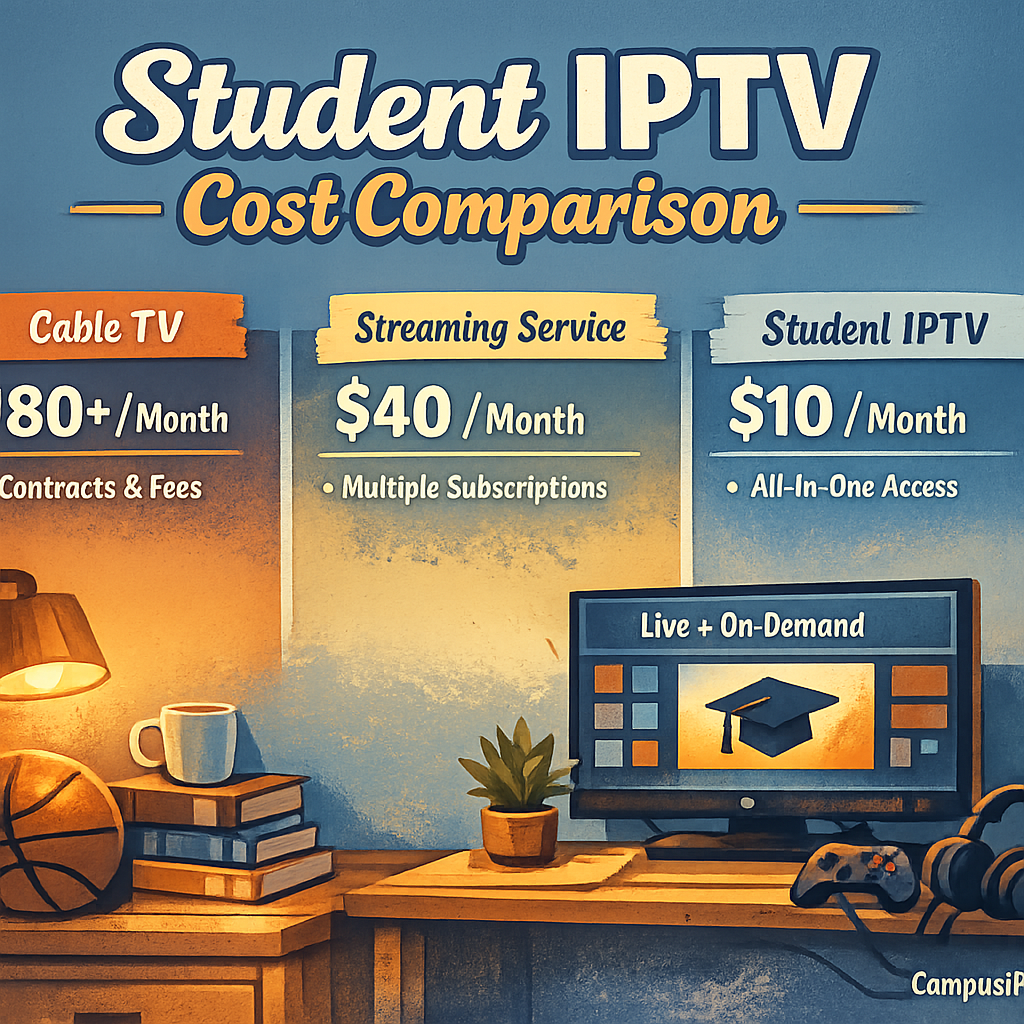
The bigger issue is stacking. A student paying for three or four separate streaming apps individually is often spending more than they would on one consolidated plan, and none of those apps talk to each other. There’s no single watchlist, no single login, no single bill. Consolidation is the actual selling point, not just price.
Bandwidth is the second failure point. Campus Wi-Fi is shared across hundreds of devices on the same subnet, and cable-replacement apps built for home broadband weren’t designed for that kind of contention. IPTV for students needs to be evaluated on how it performs under real network noise, not just its list price.
The Real Cost Breakdown: IPTV for Students vs Stacked Apps
Here’s where the actual math sits, based on typical individual app pricing versus a single consolidated plan:
- Three to four separate streaming apps individually: usually adds up to more per month than one bundled plan covering the same content range
- Shared household cable or satellite: requires a fixed address and a contract term that rarely matches an academic year
- A single IPTV for students plan: one login, one device limit to manage, one predictable monthly cost
- Mobile data burned re-buffering failed streams: an invisible cost most students never track, but it adds up fast on capped plans
Pro Tip: Before recommending or buying any plan, calculate cost per concurrent device, not cost per month. A plan that looks 20% pricier but supports three simultaneous logins is almost always the better deal for a shared dorm or house.
The consolidation argument only holds if the service is stable. A cheap plan that drops every time a roommate joins a video call isn’t actually saving anyone money, because the student ends up paying for a backup app anyway.
What to Look for in a Budget Plan Before You Buy
Price is the least useful filter when comparing IPTV for students options. The details that actually predict whether a plan survives a semester are:
- Concurrent connection limits (matches how many people in the room will use it at once)
- EPG accuracy and update frequency, since a stale guide is the first sign of a poorly maintained panel
- Support response time, ideally under 24 hours, since students troubleshoot at odd hours
- Trial period length, which signals how confident the provider is in their own uptime
A provider offering a full IPTV services overview before asking for payment is generally more transparent than one that pushes straight to checkout.
Shared Plans and Group Subscriptions: Splitting Costs Without Losing Quality
Roommate splitting is one of the biggest unlocks in student streaming, but it only works cleanly with the right connection limits. A plan built for a single household won’t hold up when four unrelated students each expect their own simultaneous stream, and pushing past the limit is what causes the freezing and kicked-off-sessions complaints that flood support inboxes every September.
The fix isn’t always a bigger plan. Sometimes it’s a sub-reseller structure, where one person manages billing and access for a small group and everyone pays their share directly to them. This is where IPTV for students setups start to resemble small-scale reselling rather than personal subscriptions, and it’s a pattern worth understanding even if you’re just trying to split a bill fairly with three roommates.
Device Compatibility: Old Laptops, Budget Phones, and Dorm TVs
Students rarely buy new hardware just to stream. A functional IPTV for students setup has to run on whatever’s already sitting on the desk: a three-year-old Android phone, a Chromebook, a secondhand Firestick picked up from a graduating senior. Compatibility across app formats (not just one ecosystem) is a bigger practical factor than most comparison articles admit.
The most common support complaint at this budget tier isn’t buffering, it’s app crashes on outdated OS versions. Before subscribing, check the provider’s minimum supported OS version against the actual device being used, not the newest model in the marketing screenshots.
Avoiding Buffering on Dorm Wi-Fi
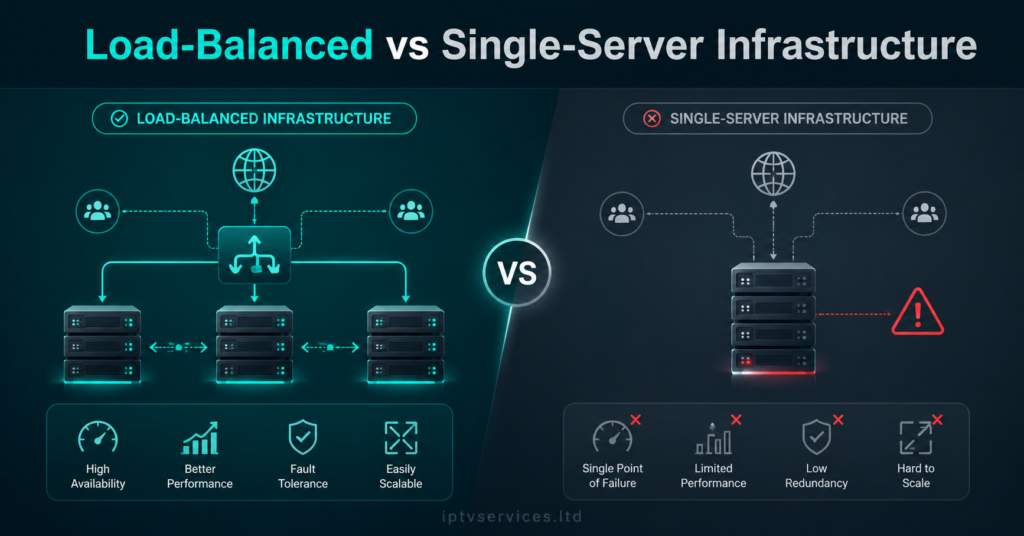
Dorm and shared-house networks are the single biggest variable in whether a budget plan feels worth it. Infrastructure quality on the provider’s end matters just as much as the student’s own connection.
| Infrastructure Type | Typical Experience on Shared Wi-Fi |
|---|---|
| Cheap, oversold panel with no backup uplink | Frequent buffering during peak hours, frozen EPG, dropped sessions when the primary server saturates |
| Load-balanced panel with backup uplink servers | Consistent HLS playback even during high-demand hours, automatic failover if one server strains |
| Single-server budget panel | Works fine off-peak, degrades sharply once dozens of students stream simultaneously in the evening |
| Multi-CDN setup with regional routing | Lower latency regardless of how many devices are active on the same campus subnet |
Pro Tip: Ask any provider directly whether they run backup uplink servers. A provider without failover capacity will always look fine in a demo and fall apart during a Friday-night dorm rush.
Understanding how the panel infrastructure works behind a subscription is genuinely useful even for a non-reseller, since it explains why two plans priced identically can perform completely differently. The mechanics are laid out in more depth in this breakdown of how an IPTV reseller panel works.
Why Some Cheap Deals Are Too Good to Be True
There’s a specific failure pattern with rock-bottom IPTV for students pricing: the deal looks identical to a legitimate mid-tier plan on the surface, but the panel behind it is running far past its safe concurrent-connection capacity. It works for the first week, then degrades as the provider oversells the same server capacity to more subscribers than it can support.
Signs worth watching for: no trial period at all, payment only accepted through untraceable methods, and support that disappears after the first payment clears. None of these are dealbreakers individually, but two or more together is a pattern, not a coincidence. ISP-level deep packet inspection and DNS poisoning waves have also made connection stability a moving target across 2026, so a provider’s ability to adapt matters more than the sticker price alone.
How Resellers Can Target the Student Market Without Burning It
Students are high-volume, price-sensitive, and highly seasonal, which makes them a distinct segment from a typical family household subscriber. The churn pattern is different too: expect a wave of cancellations every May and a wave of new signups every September, and plan panel credit allocation around that rhythm rather than treating it as a steady year-round base.
The margin comes from volume and low support overhead, not from high per-subscriber pricing. Keeping onboarding simple (clear device setup instructions, a working EPG from day one, a fast first response to any ticket) reduces refund requests far more effectively than discounting further. A full look at building this out is covered under IPTV services for anyone scaling a sub-reseller operation around a campus or student housing cluster. For a sense of how an established UK operation structures its student and household tiers, britishseller.co.uk is a useful reference point.
Frequently Asked Questions
Is IPTV for students actually cheaper than a Netflix, Prime, and Disney+ stack?
For most students juggling three or more individual apps, yes. A single consolidated plan typically costs less per month than stacking separate subscriptions, especially once shared or split billing is factored in among roommates.
How many devices can typically run on one student plan?
This depends entirely on the provider’s connection limit, which usually ranges from one to three simultaneous streams per plan tier. Always confirm concurrent device limits before assuming a plan supports a shared household.
Will IPTV for students work on a five-year-old laptop?
In most cases yes, as long as the provider supports browser-based or lightweight app access rather than requiring the newest OS version. Always check minimum OS requirements against the actual device before subscribing.
Can I split an IPTV for students plan with roommates safely?
Yes, this is common, but it works best with a plan rated for multiple concurrent connections rather than a single-device plan. Splitting a single-device plan across several people usually causes forced logouts and buffering complaints.
Why does my stream buffer more in the evening than during the day?
Evening hours are peak demand across most residential and campus networks, so any provider without backup uplink servers or load balancing will show more strain exactly when the most students are trying to watch something at once.
Is it worth reselling IPTV plans specifically to students?
It can be profitable due to high volume and word-of-mouth growth within a campus, but margins depend on managing seasonal churn (heavy cancellations each summer) and keeping support response times fast enough to avoid refund requests.
What’s the biggest red flag in a cheap student IPTV deal?
No trial period combined with untraceable payment methods only is the clearest warning sign. A legitimate provider is usually willing to demonstrate stability before asking for a full payment.
Does a cheaper plan mean worse EPG accuracy?
Not always, but it’s a reasonable pattern to check. A poorly maintained panel often shows outdated program guide data before any other symptom appears, so a quick look at the EPG is a fast way to judge overall panel quality.
Subscriber Checklist
- Confirm concurrent device limit matches your household or roommate group
- Test the trial period on your actual device before paying full price
- Check EPG accuracy as a quick quality signal
- Track your real cost against what you were paying for stacked apps
Reseller Checklist
- Budget panel credit allocation around the September signup spike and May cancellation wave
- Confirm your upstream panel runs backup uplink servers before marketing peak-hour reliability
- Keep first-response support time under 24 hours to reduce refund requests
- Document minimum device OS requirements clearly on your sales page
Sub-Reseller Checklist
- Set clear concurrent-connection limits before splitting a plan across multiple roommates
- Collect payment on a fixed schedule to avoid chasing individual students mid-semester
- Keep one point of contact for support issues instead of routing each roommate separately
- Confirm your own upstream plan supports the total device count you’re reselling into
Conclusion
IPTV for students only pays off when the plan is chosen for connection limits, infrastructure quality, and device compatibility, not just the sticker price. The cheapest option on paper is frequently the most expensive one in practice once buffering, dropped sessions, and wasted mobile data are factored in. A little diligence before subscribing (or before reselling into a campus market) saves both money and support headaches over a full academic year.