
How to Organize Favorite Channels on IPTV (Without It Falling Apart in a Week)
I’ve watched subscribers abandon perfectly good services for one reason that has nothing to do with buffering or pricing: they couldn’t find their channels. A list of 8,000 channels with zero structure is worse than a list of 50 done right. Knowing how to organize favorite channels on IPTV properly is the difference between a household that streams happily for years and one that churns out of frustration within a month.
Why Most People Organize Favorite Channels on IPTV Wrong
The default mistake is treating favorites like a junk drawer — adding channels as they’re discovered, never removing anything, never grouping by purpose. Within a few weeks the favorites list is just as bloated and unsearchable as the full channel guide it was meant to replace.
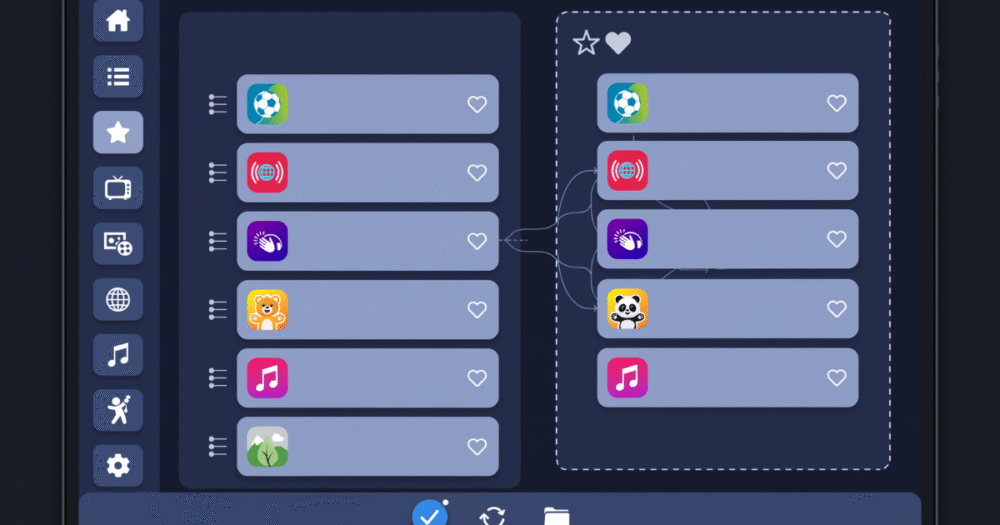
The fix isn’t a longer favorites list. It’s a structured one. Favorites should be organized by how content gets watched, not by category labels copied from the EPG. That means grouping by viewing occasion: morning news, kids’ daytime block, evening sports, late-night international news, weekend movie rotation. This mirrors actual household behavior far better than alphabetical or genre-based sorting.
Pro Tip: Ask every household member what they watch in the first five minutes after turning on the TV. Build your top favorites tier around those answers — not around what’s technically “most popular” in the EPG.
Most apps that support favorites also support numbered presets (1-9 or 1-20 depending on the app). Assign these to the channels watched daily, not weekly. This single habit eliminates 80% of the “I can’t find my channel” support tickets resellers deal with.
This matters even more on multi-device households, where Smart TVs, Firestick, and mobile apps each maintain separate favorite lists unless synced through the same provider account.
Setting Up Favorites in TiviMate the Right Way
TiviMate remains the most flexible player for structuring favorites, and most of its power goes unused. The default single favorites star treats every channel identically — but TiviMate supports multiple custom categories functioning like separate favorites folders.
Create categories by purpose, not content type: “Daily Watch,” “Sports Days Only,” “Kids Supervised,” “Background Noise.” This structure survives long-term because it’s based on usage pattern, which doesn’t change even when specific channel lineups do.
- Long-press any channel to add it to a custom category instantly
- Drag-reorder within each category — TiviMate preserves manual order, unlike auto-sorted lists
- Use the EPG grid view filtered by category for fast browsing during specific viewing windows
- Hide the master, unfiltered channel list entirely from casual household members
Pro Tip: Set the default home screen view to your most-used custom category, not the full EPG grid. This removes the single biggest cause of decision fatigue for non-technical household members.
One frequent error: rebuilding favorites from scratch after every playlist refresh. Quality IPTV services maintain consistent channel numbering across updates specifically so favorites don’t break — worth checking before assuming TiviMate is at fault.
Organizing Favorite Channels on IPTV for Multi-User Households
A single shared favorites list rarely works once more than two people share a connection. Parents want news and documentaries; kids want a narrow, supervised list; teenagers want sports and entertainment mixed together. Forcing everyone into one list creates constant re-sorting and frustration.
| Setup | Best For | Maintenance Load | Risk of Conflict |
|---|---|---|---|
| One shared favorites list | Single viewer households | Low | High |
| Per-profile favorites (app-supported) | Multi-user homes | Medium | Low |
| Separate device logins per person | Larger households, multiple TVs | Higher | Very low |
| Parental-locked category + open category | Families with young kids | Medium | Low |
Apps like IPTV Smarters Pro support multiple profiles under one subscription, each with independent favorites and parental restrictions. This is significantly cleaner than one person curating a master list that everyone else has to navigate around.
Pro Tip: For households with young children, build the kids’ favorites list first and lock it down before configuring everyone else’s — retrofitting parental controls onto an existing mixed list is far messier than starting separate.
Syncing Favorites Across Devices Without Losing Them
Favorites built on a Firestick don’t automatically appear on the bedroom Smart TV or the tablet used for travel. This is the single most common complaint resellers field after onboarding: “I set up my favorites and they’re gone on the other device.”
The cause is almost always local, app-level storage rather than account-level sync. Some apps store favorites only on-device; others sync through the provider’s backend using the Xtream Codes API, tied to the account rather than the device.
Pro Tip: Before troubleshooting “lost” favorites as a bug, check whether the app in question supports account-level sync at all — many genuinely don’t, and the fix is switching apps, not reconfiguring.
- Confirm which player apps on your setup support cloud-synced favorites
- Standardize on one app across all household devices where possible
- Re-export or re-import favorites lists manually as a fallback for apps without sync
- Document the household’s favorites structure somewhere outside the app, in case of a factory reset
This is where panel-side configuration matters more than people expect. Providers offering IPTV reseller services with consistent backend channel numbering make manual re-sync far less painful when it’s needed.
How Resellers Should Guide Subscribers on Channel Organization
For resellers and sub-resellers, “how do I organize favorite channels on IPTV” is one of the most common onboarding questions — and one of the easiest to turn into a retention tool. A five-minute walkthrough during setup prevents a steady trickle of support tickets later.
Build a simple onboarding script: ask the subscriber what they watch daily, help them set up 10-15 starter favorites in that first session, and show them how to add more later themselves. Subscribers who leave onboarding with an organized favorites list churn less than those left to figure it out alone, because the service feels usable from day one rather than overwhelming.
Pro Tip: Track which subscribers contact support asking “where did my channels go” within the first week — this almost always traces back to skipped or rushed onboarding, not a technical fault.
Sub-resellers managing smaller subscriber batches should standardize this onboarding script across every new signup rather than improvising it each time. Consistency here reduces first-month churn more than almost any other single intervention.
Channel Numbering and Why It Breaks Favorites After Updates
Favorites tied to channel numbers rather than channel names will break every time a playlist refresh reorders the lineup — a frustrating but common issue that has nothing to do with the subscriber’s setup and everything to do with backend panel management.
Stable providers maintain fixed channel number mapping across updates specifically to prevent this. When evaluating or troubleshooting a provider, ask directly whether channel numbers are preserved during EPG and playlist refreshes — this single detail determines whether favorites survive routine maintenance.
Pro Tip: If favorites break repeatedly after every update, the fault sits with panel-side numbering consistency, not the player app. Raise it with your upstream provider directly rather than re-troubleshooting the same app repeatedly.
Resellers sourcing from unstable upstream panels often don’t realize this is the root cause of recurring “favorites disappeared” tickets. Reviewing infrastructure standards via britishseller.co.uk before committing to a panel provider can save months of avoidable churn.
Frequently Asked Questions
How do I organize favorite channels on IPTV across multiple devices?
Use an app that supports account-level cloud sync rather than local, device-only storage. Standardizing on one player app across all household devices avoids the most common cause of favorites disappearing between a Firestick, Smart TV, and mobile app.
Why do my IPTV favorites disappear after an update?
This usually happens when favorites are tied to channel numbers rather than names, and a playlist refresh reorders the lineup. Stable backend providers preserve fixed channel numbering specifically to prevent this from happening during routine EPG updates.
Can I have separate favorites for different family members?
Yes, if your app supports multiple profiles. Apps like IPTV Smarters Pro allow independent favorites lists and parental restrictions per profile under a single subscription, which avoids the conflict of one shared list trying to serve different viewing habits.
What’s the best way to organize favorite channels on IPTV for sports?
Create a dedicated sports-only category separate from daily favorites, since sports viewing is occasion-based rather than daily. This keeps the daily-use favorites list lean while still giving quick access to sports during matches without cluttering everyday browsing.
Is it better to use numbered presets or custom categories?
Numbered presets work best for a small handful of daily-use channels. Custom categories work better for organizing larger groups by occasion or viewer. Most households benefit from combining both — presets for top channels, categories for everything else.
How many channels should I add to favorites?
There’s no fixed number, but most usable setups stay under 30-40 total favorites split across categories. Beyond that, the list becomes as hard to navigate as the full EPG, defeating the purpose of curating favorites in the first place.
Why should resellers care how subscribers organize their favorites?
Subscribers who never organize favorites tend to feel overwhelmed and churn faster, often blaming the service rather than their own setup. A short onboarding walkthrough on organizing favorites measurably reduces early support tickets and improves retention.
Do all IPTV apps support custom favorite categories?
No. Some apps only support a single default favorites star with no further structure. Apps like TiviMate support multiple custom categories, which is why player app choice matters as much as the subscription itself for long-term usability.
Success Checklist
For Subscribers:
- Build favorites around viewing occasions, not alphabetical order or genre
- Set numbered presets for daily-use channels only
- Document your favorites structure outside the app as a backup
- Standardize on one player app across all household devices
For Resellers:
- Include a favorites-setup walkthrough in every onboarding session
- Track “where did my channels go” tickets as an onboarding gap indicator
- Confirm your panel preserves fixed channel numbering across updates
- Promote how an IPTV reseller panel works to subscribers who want to understand backend stability
For Sub-Resellers:
- Standardize the same onboarding script across every new signup
- Set up kids’ profiles and locked categories before configuring general favorites
- Escalate repeated “favorites broke after update” complaints to your upstream provider
- Verify channel-numbering consistency with your panel source before reselling at scale