

IPTV Latency Explained: Why Live TV Runs Behind
If you have ever watched a goal go in on your neighbor’s satellite dish ten seconds before it happens on your IPTV screen, you already understand the problem this article is here to solve. IPTV latency explained simply: it is the gap between the moment an event happens in a stadium and the moment it reaches your screen through an internet-delivered service, and that gap is built into how the entire delivery chain works, not just your Wi-Fi. For subscribers this shows up as an annoying delay during big matches. For resellers and sub-resellers, unexplained latency complaints are one of the top drivers of support tickets and churn, especially during high-traffic live events. Getting the explanation right, and knowing which settings actually move the needle, separates operators who keep customers calm from operators who lose them to a competing panel after one bad weekend.
This piece breaks down where the seconds actually come from, why some households see more delay than others on the same panel, and what can realistically be tuned versus what is simply the cost of doing streaming over the open internet in 2026.
Where the Delay Actually Starts: Encoding, Not Your Connection
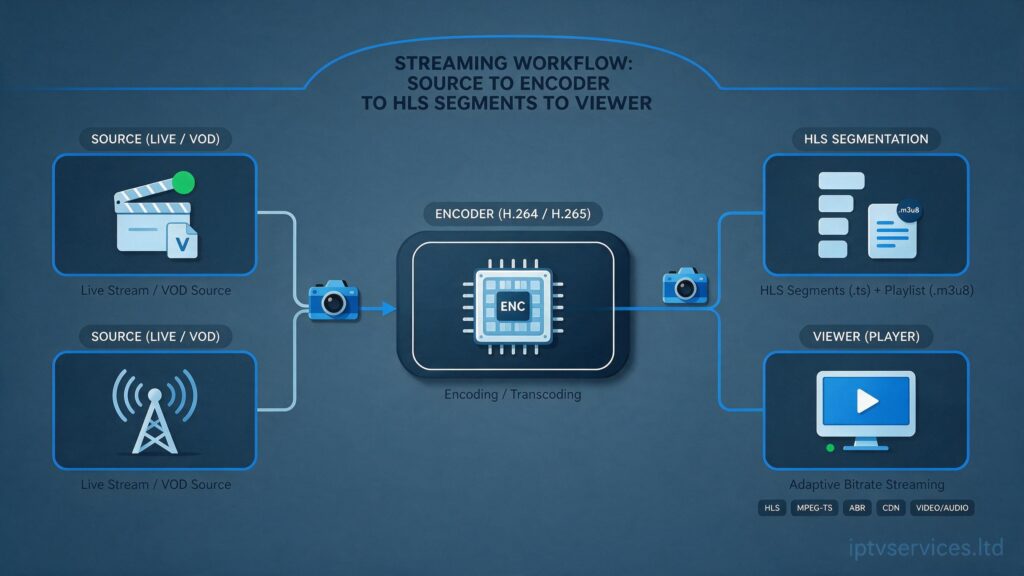
The first mistake most subscribers make is assuming latency is a home broadband issue. In reality, most of the delay is added before the stream ever leaves the source. Live broadcast signals are captured, then encoded into a compressed digital format suitable for internet delivery. That encoding step alone typically adds two to six seconds, because the encoder has to buffer enough frames to compress efficiently rather than sending raw, uncompressed video frame by frame.
From there the stream is packaged for delivery, most commonly using HLS (HTTP Live Streaming), which slices video into short segments, usually two to ten seconds each. A player has to download several segments before it starts playing, both to build a safety buffer and to smooth out network jitter. This segment-based approach is exactly why IPTV, almost universally, runs behind traditional broadcast: HLS delivery was designed for reliability over huge numbers of simultaneous viewers, not for shaving off every possible second.
Pro Tip: When a customer says “my stream is 15 seconds behind,” ask what segment duration your panel provider uses before assuming it is a local network problem. A provider running 10-second HLS segments will always feel laggier than one running 2-second segments, regardless of the subscriber’s internet speed.
Understanding this distinction matters because it reframes the conversation. Latency is not usually something a reseller broke. It is something baked into the delivery method chosen upstream, and IPTV latency explained honestly means acknowledging that some delay is structural, not a fault.
Why the Same Panel Feels Faster or Slower Depending on the Household
Two subscribers on the same panel, watching the same channel, can experience noticeably different delay. This confuses a lot of resellers because the source and encoding are identical for everyone. The variance comes from three layers that sit between the origin server and the living room screen.
First is CDN routing. Content delivery networks cache and relay streams from edge servers closer to the viewer, but not every household gets routed to the same edge node, especially when ISPs peer differently with different CDN providers. Second is local network buffering, where a router, a mesh extender, or a VPN adds its own processing delay on top of everything upstream. Third is player-side buffer settings, since some IPTV apps are configured to hold a larger safety buffer to avoid rebuffering, which trades a few extra seconds of delay for a smoother, stutter-free picture.
- CDN edge distance: routing through a farther edge node can add noticeable delay even on fast connections
- Router-level buffering: mesh systems and older routers sometimes double-buffer video traffic unnecessarily
- App buffer settings: a larger player buffer reduces freezing but increases the live-to-screen gap
- VPN or proxy use: encryption and rerouting overhead adds delay that has nothing to do with the panel itself
- Device hardware: older set-top boxes and budget Android boxes decode slower than current-generation Firestick or Apple TV hardware
Resellers who understand this list can triage tickets far faster, because most “my IPTV is slow” complaints trace back to one of these five points rather than a panel-wide fault.
AI-Driven ISP Blocking Trends and Their Effect on Delay
2026 has brought a noticeable shift in how ISPs identify and interfere with unauthorized streaming traffic, and it is directly relevant to latency. Rather than blunt IP blocking, more ISPs are now using traffic-pattern analysis, essentially machine-learning models trained to recognize the signature of streaming traffic based on packet timing, size, and destination behavior, even when the traffic itself is encrypted. When this kind of detection triggers, some ISPs do not block the connection outright but instead throttle it, deliberately slowing throughput on flagged traffic. That throttling shows up to the subscriber as sudden buffering or a widening latency gap that has nothing to do with the panel or the server load.
This is a meaningfully different threat model than the DNS poisoning and simple IP-range blocking that dominated earlier enforcement waves. DNS poisoning corrupts the address lookup so a device cannot even find the server. AI-driven throttling lets the connection through but degrades it, which is harder for both subscribers and resellers to diagnose because the stream does not fail outright, it just gets progressively worse.
Pro Tip: If a subscriber reports latency that gets worse specifically during peak evening hours and during major live sporting windows, suspect pattern-based throttling before assuming server overload. Ask them to test on mobile data briefly; if the delay disappears, the ISP connection is the likely culprit.
Why Backup Uplink Servers Matter More Than Most Resellers Realize
Every experienced operator has, at some point, lost a primary server during a high-traffic window and watched churn spike within the hour. Backup uplink servers exist specifically to prevent that scenario from becoming a latency problem in the first place. When a primary server becomes overloaded, either from too many concurrent connections or from an upstream routing issue, a properly configured failover setup shifts traffic to a secondary uplink automatically, often before subscribers notice anything beyond a brief stutter.
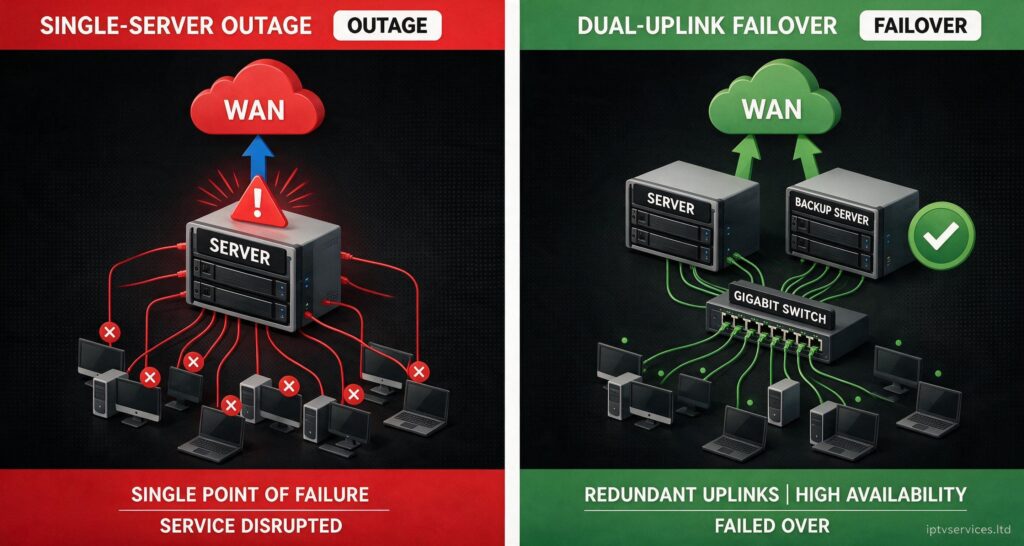
The alternative, running without redundancy, means that any single point of congestion becomes a latency spike for every connected household simultaneously. This is the difference between “my stream had a rough ten seconds” and “the whole panel went down during the biggest match of the year.” For sub-resellers reselling credits from a larger operator, it is worth directly asking the upstream provider whether failover uplinks exist and how quickly they engage, because that answer predicts how bad your worst night of the year will be.
| Infrastructure Type | Typical Latency Under Load | Failover Behavior |
|---|---|---|
| Single-server setup | Increases sharply during peak concurrent connections | None; full outage risk during overload |
| Load-balanced dual server | Stays relatively stable under moderate spikes | Manual failover, some delay during switch |
| Multi-region with backup uplink | Minimal increase even during major live events | Automatic failover, sub-second switching |
Panel Credits, Concurrent Connections, and Why Overselling Creates Delay
Panel management decisions made months before a big match directly shape latency on the night of the event. Every server has a realistic ceiling on concurrent HLS connections before load balancing starts to strain, and pushing past that ceiling does not cause an instant crash, it causes creeping latency across every connected session as the server struggles to keep segment delivery on schedule. This is one of the more preventable causes of delay, and it comes down entirely to how credits and connections are managed at the reseller and sub-reseller level.
Overselling capacity, common among operators chasing short-term revenue, quietly degrades the experience for every subscriber on that server, not just the newest ones. A subscriber who has had a perfectly stable connection for months can suddenly start reporting delay simply because dozens of new sub-reseller accounts were provisioned onto the same infrastructure without a corresponding capacity increase. Monitoring concurrent connection counts against server capacity, rather than only tracking credit sales, is the kind of operational discipline that keeps latency complaints rare instead of routine.
Realistic Latency Reduction Settings That Do Not Break Stability
Chasing the lowest possible number is usually the wrong goal, because latency and stability sit on opposite ends of the same dial. Reducing HLS segment length from the common six-to-ten-second range down to two or three seconds can meaningfully cut delay, but it also increases the request frequency the player makes to the server, which raises the risk of stutter on unstable connections. The right setting depends heavily on what the subscriber actually needs.
For a household simply watching a drama series, a slightly larger buffer trading two or three extra seconds of delay for zero rebuffering is almost always the better trade. For a subscriber watching live sport who cares about being close to real time, shorter segments and a smaller player buffer make sense, accepting a small increased risk of a stutter in exchange for staying closer to the live edge. Explaining this trade-off directly to subscribers, rather than promising “zero delay,” builds far more trust than an unrealistic guarantee that inevitably gets tested during the next big match.
- Shortening HLS segments reduces delay but increases stutter risk on weaker connections
- Lowering player buffer size brings the stream closer to live but raises freeze risk during congestion
- Wired ethernet over Wi-Fi removes one layer of local buffering delay entirely
- Closing background bandwidth-heavy apps reduces device-level processing delay
- Choosing a device with modern hardware decoding reduces the milliseconds added at the screen
This is where working with a capable IPTV services provider actually matters, because segment length and buffer defaults are configured at the panel level long before a subscriber ever touches a settings menu.
Educating Subscribers Without Overpromising
The households that generate the fewest latency complaints tend to be the ones told upfront, at the point of sale, that some delay versus traditional broadcast is normal for any internet-delivered service, not unique to their panel. Setting that expectation early prevents the “why is IPTV behind live TV” ticket from ever landing in the first place. When it does land, the fastest resolution path is usually the shortest explanation: internet-delivered TV buffers by design for stability, the gap is typically five to twenty seconds depending on the provider chain, and it can be reduced but not eliminated without sacrificing reliability.
Resellers who keep a short, pre-written explanation ready for this exact question save themselves enormous support time during major live events, when this is by far the most common ticket category. Understanding how an IPTV reseller panel works end to end, from source capture through to the subscriber’s device, makes that explanation credible rather than generic.
Frequently Asked Questions
Why does my IPTV stream run behind normal TV during football matches?
Live IPTV delay comes mainly from encoding and HLS segment buffering upstream, not your home connection. Segments must download before playback starts, adding several seconds by design. During major matches this can feel more noticeable because everyone around you may be watching the broadcast version simultaneously.
Can I reduce IPTV latency without causing buffering?
You can reduce it somewhat by using wired ethernet, closing background apps, and choosing devices with modern hardware decoding. Full elimination is not possible with HLS delivery, and pushing settings too aggressively toward low latency raises the risk of stutter on less stable connections.
Is 10 to 15 seconds of IPTV latency explained by a bad panel?
Not necessarily. That range is common across most HLS-based IPTV delivery in 2026, including many legitimate broadcast streaming apps. A poorly configured panel can add extra delay on top of this baseline, but the baseline itself is structural to the delivery method, not a sign of a broken service.
How can resellers tell if latency complaints are ISP throttling instead of server load?
Ask the subscriber to briefly test on mobile data or a different network. If delay drops sharply, AI-driven traffic throttling on their home ISP is the likely cause rather than server-side congestion. Comparing complaint timing against known peak-load windows also helps separate the two causes.
Does a VPN make IPTV latency better or worse?
A VPN typically adds latency because of encryption and rerouting overhead, even though it can help route around ISP-level throttling in some cases. Whether the net effect is positive depends on how much the ISP is already interfering with the connection versus how much overhead the VPN itself introduces.
What is a safe HLS segment length for balancing delay and stability?
Four to six second segments are a common middle ground, low enough to keep live delay reasonable and long enough to avoid excessive stutter risk on average home connections. Live sport panels sometimes push shorter, while general entertainment panels often run longer for stability.
Should sub-resellers ask upstream providers about backup uplink servers?
Yes, this is one of the most useful questions a sub-reseller can ask before committing volume to a provider. Automatic failover to a backup uplink is the difference between a brief stutter and a full outage during the highest-traffic live events of the year, which directly affects retention.
Why does the same panel feel faster on one device than another in the same house?
Device hardware decoding speed, app buffer settings, and even Wi-Fi versus ethernet connection type all add or remove milliseconds independently of the panel itself. Two devices on identical broadband can show different latency purely because of local processing differences.
Success Checklist
For Subscribers
- Use wired ethernet where possible instead of relying on Wi-Fi for live viewing
- Expect a normal 5 to 20 second gap versus broadcast TV and avoid chasing zero delay
- Test on mobile data if delay spikes suddenly, to rule out home ISP throttling
- Keep the IPTV app and device firmware updated for better decoding efficiency
For Resellers
- Keep a short, ready-made explanation of normal latency ranges for subscriber tickets
- Monitor concurrent connections against real server capacity rather than only credit sales
- Confirm segment length and buffer defaults with your panel provider before peak events
- Track whether latency complaints cluster around peak hours to spot throttling patterns early
For Sub-Resellers
- Ask upstream providers directly whether automatic failover to backup uplink servers exists
- Avoid overselling credits onto shared infrastructure without confirming capacity headroom
- Set subscriber expectations at point of sale to reduce latency-related churn later
- Escalate recurring latency clusters to the upstream provider rather than absorbing repeat tickets alone
For a working example of how latency expectations are communicated at the point of sale, britishseller.co.uk is a useful reference for how UK-facing panels frame this conversation with new subscribers.