
What IPTV Adaptive Bitrate Streaming Actually Does Behind the Screen
Most subscribers think buffering is bad internet. Most resellers think it is a server problem. Both are partially right — but neither understands the mechanism sitting between them. That mechanism is IPTV adaptive bitrate streaming, and it is the single most important delivery technology in your infrastructure stack.
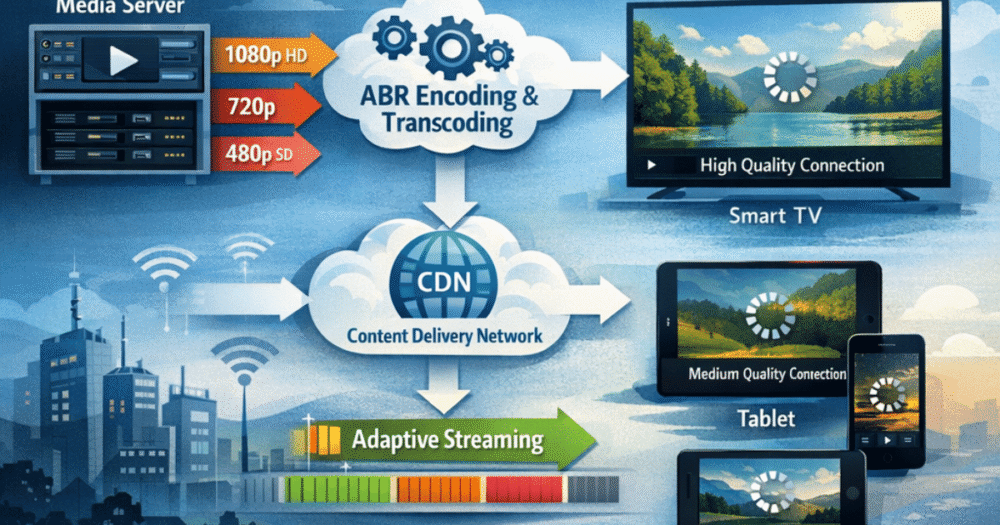
IPTV adaptive bitrate streaming works by encoding every stream at multiple quality levels simultaneously — typically ranging from 360p at around 600 Kbps all the way up to 4K at 15–20 Mbps. The player on the viewer’s device then monitors available bandwidth in real time and automatically switches between those quality tiers every few seconds. When the connection dips, it steps down. When it recovers, it steps back up. The viewer barely notices. Without ABR, one bandwidth spike kills the stream entirely.
If you are reselling subscriptions and your upstream provider does not serve genuine ABR streams, every subscriber on a fluctuating home connection — which is most of them — is one congested evening away from a refund request.
- ABR encodes each stream at 5–8 quality levels called an encoding ladder
- Each level is broken into short 2–6 second segments
- A manifest file (M3U8 for HLS, MPD for DASH) tells the player what is available
- The player’s ABR algorithm selects segments based on buffer health and bandwidth estimates
- Switches happen continuously — often multiple times per minute — without freezing
Pro Tip: ABR does not eliminate the need for strong server infrastructure. It compensates for the viewer’s network instability. If your upstream servers are underprovisioned, no amount of bitrate switching saves a stream that was never properly delivered in the first place.
The Encoding Ladder: Why Not All ABR Streams Are Equal
Understanding IPTV adaptive bitrate streaming requires understanding the encoding ladder — the set of quality renditions your provider actually encodes and serves. A weak encoding ladder means the player has fewer options when conditions change. A strong one means smooth transitions that viewers never consciously register.
A properly built encoding ladder for live IPTV looks roughly like this:
| Quality Tier | Resolution | Bitrate |
|---|---|---|
| Ultra HD | 2160p (4K) | 15–20 Mbps |
| Full HD | 1080p | 5–6 Mbps |
| HD | 720p | 2.5–3.5 Mbps |
| SD | 480p | 1–1.5 Mbps |
| Low | 360p | 600–800 Kbps |
The problem in the reseller market is that many upstream providers advertise “4K streams” but their encoding ladder only has two or three rungs. That means when a subscriber’s bandwidth dips below the 1080p threshold, the player has nowhere to go except complete failure. There is no graceful degradation — just a frozen screen.
Live sports content is particularly demanding here. A stadium broadcast with rapid motion, crowd noise, and dynamic lighting is far harder to compress cleanly than a static news channel. Providers that use content-aware encoding — adjusting the ladder per content type — will always outperform those using a one-size-fits-all approach.
When evaluating upstream suppliers as a reseller, always ask specifically about encoding ladder depth. “We offer 4K” tells you nothing useful. The number of rungs between 4K and 480p tells you everything about how that stream behaves when real-world connections do what real-world connections do.
HLS vs MPEG-DASH: Which ABR Protocol Your Panel Should Prioritise
IPTV adaptive bitrate streaming runs on two dominant protocols — HLS and MPEG-DASH — and choosing between them is not an aesthetic decision. It has direct consequences for device compatibility, latency, and the support tickets your customers will raise.
HLS (HTTP Live Streaming) was developed by Apple and remains the de facto standard for IPTV delivery. It uses the M3U8 playlist format, which anyone in the reseller ecosystem will immediately recognise. It works natively on iOS, tvOS, most Smart TVs, and every major IPTV player including TiviMate and IPTV Smarters Pro. If you are running a panel using Xtream Codes API or a compatible interface, the streams your subscribers load are almost certainly HLS.
MPEG-DASH is the open international standard — codec-agnostic and more flexible — but it requires client-side player support because browsers do not handle it natively. It performs better on modern Android devices and web-based players but creates compatibility gaps on older MAG boxes and budget Smart TVs.
- HLS: better device compatibility, native Safari and Smart TV support, wider MAG box coverage
- DASH: better for modern Android and web, more codec flexibility, lower latency potential in optimal conditions
Pro Tip: In 2026, the practical answer for most resellers is HLS. Your subscriber base almost certainly spans a wide device range — Firestick users, Android box users, MAG users, Smart TV users. HLS covers all of them without edge-case compatibility failures.
The smarter upstream providers now encode to both formats from a single rendition ladder and serve whichever protocol the requesting device declares. This costs more infrastructure but eliminates device-specific complaints almost entirely.
How ISP Deep Packet Inspection Attacks ABR Streams
Here is where IPTV adaptive bitrate streaming collides with the enforcement reality of 2026. ISPs using deep packet inspection (DPI) can identify HLS segment request patterns — the repeated HTTP calls for .ts files every few seconds — and selectively throttle or interrupt them without affecting general browsing or mainstream streaming platforms.
This creates a specific failure mode that confuses both subscribers and resellers. The subscriber’s speed test shows 100 Mbps. Netflix works. YouTube works. But the IPTV stream buffers at 720p and never steps up to 1080p. The ABR algorithm is trying to scale quality, but the ISP is quietly capping the segment download speed before it can.
The consequences cascade fast:
- Subscriber blames the reseller
- Reseller raises a ticket with the upstream provider
- Provider sees clean server-side metrics and closes the ticket
- Subscriber requests a refund
- Reseller absorbs the loss and gains nothing
Providers with obfuscated delivery paths — routing HLS traffic through ports and patterns that do not match standard DPI signatures — give their resellers a structural advantage here. When your upstream builds ABR delivery specifically to resist ISP-level inspection, your retention rates reflect that engineering investment.
This is one of the key criteria resellers at britishseller.co.uk evaluate when comparing upstream suppliers — not just channel counts or pricing, but the delivery architecture underneath the stream.
Buffer Health Management: What Your Player App Is Actually Doing
IPTV adaptive bitrate streaming does not operate blindly. The ABR algorithm inside a player like TiviMate or IPTV Smarters Pro is making continuous calculations using two primary data inputs: estimated bandwidth and buffer health. Understanding these inputs helps resellers diagnose problems more precisely instead of defaulting to “the server must be down.”
Bandwidth estimation measures how fast recent segments have been downloaded. If the last three segments each downloaded in 1.2 seconds and they represent 2 seconds of playback, the player knows it is comfortably ahead. If a segment takes 3 seconds to download for 2 seconds of playback, the buffer is shrinking.
Buffer health is the pre-loaded video segment held in memory ahead of the current playback position. A healthy IPTV stream maintains a 10–20 second buffer. When this drops below 2–3 seconds, the ABR algorithm drops to a lower quality tier immediately to buy time. If the server cannot respond even at the lowest tier, the stream stalls.
- Cheap IPTV apps with poor ABR logic step down too slowly, causing visible freezes before switching
- Well-built players like TiviMate react within one segment — under 4 seconds — making quality drops nearly invisible
- Hardware decoding on Firestick and Android boxes reduces the processing overhead that would otherwise delay ABR decisions
Pro Tip: If a subscriber reports “it buffers then drops to low quality,” the ABR is working correctly but the buffer threshold is too aggressive. Recommend they switch to the hardware decoder setting in their player. If they report “it freezes completely without dropping quality first,” the app lacks proper ABR logic entirely — switch the player.
For a detailed breakdown of how IPTV services handle buffer management across different devices and panel configurations, the technical resources at iptvservices.ltd cover the infrastructure decisions that determine real-world player behaviour.
Why Cheap Reseller Panels Fake ABR and What Happens When Load Spikes
This is the conversation the reseller forums avoid. A significant portion of budget upstream providers advertise “adaptive bitrate streaming” without actually implementing it correctly. What they serve is a single-bitrate HLS stream wrapped in an M3U8 file that references only one quality level. The manifest exists, the protocol is technically HLS, but the encoding ladder has one rung.
Under normal load, the subscriber never notices. The single bitrate is high enough to play. Then a major match kicks off, simultaneous connections spike, and the server becomes congested. Instead of ABR smoothly stepping down to a lower tier, every stream on that server competes for the same bandwidth at the same bitrate. The result is catastrophic — not graceful degradation, but mass simultaneous freezing.
This is precisely what happened to hundreds of resellers during high-demand sporting events before the 2026 FIFA World Cup cycle. Providers that looked fine during testing buckled completely under real load because their “ABR” was marketing language, not engineering reality.
Signs your upstream provider is not genuinely running multi-tier ABR:
- All subscribers on a panel experience identical quality drops simultaneously
- No quality step-down visible before complete freeze
- M3U8 file shows only one stream URL without multiple bandwidth declarations
- Provider cannot tell you their encoding ladder specifications when asked directly
When evaluating a panel for IPTV reseller panel purchases, demand to see the M3U8 manifest. A genuine multi-tier ABR stream will show multiple #EXT-X-STREAM-INF entries with different bandwidth values. One entry means one bitrate. That is not adaptive streaming — it is a fixed stream with an adaptive label.
Back-Up Uplink Servers and How ABR Routing Connects to Failover
IPTV adaptive bitrate streaming handles viewer-side bandwidth variability. Failover infrastructure handles server-side availability. These are different problems and they require different solutions — but resellers consistently conflate them, which leads to infrastructure decisions that solve neither.
ABR keeps a stream smooth when a subscriber’s home connection fluctuates. It cannot compensate if the origin server delivering the stream goes offline. That is the job of back-up uplink servers and CDN failover routing. A provider running genuine redundancy automatically reroutes stream delivery from a failed origin to a standing backup — typically within 2–8 seconds — without the subscriber needing to refresh or relaunch.
The connection between ABR and failover becomes critical during events like major sporting finals or unexpected server incidents. A provider with both real ABR encoding and proper failover architecture handles these events in layers: the ABR manages individual connection variability while the failover infrastructure ensures continuity if a delivery node drops entirely.
What to look for in your upstream provider’s failover setup:
- Multiple geographically distributed origin servers, not just redundant hardware in one data centre
- Automatic DNS rerouting when a node becomes unresponsive
- CDN edge caching for popular live channels to reduce origin load during spikes
- Transparent uptime reporting so you know when failover actually triggered
Pro Tip: Ask your upstream provider directly: “What happens to my subscribers’ streams if your primary ingest server goes offline during a live event?” The answer tells you more about their infrastructure maturity than any sales page will.
Frequently Asked Questions
What is IPTV adaptive bitrate streaming in simple terms?
IPTV adaptive bitrate streaming is a delivery method where every stream is encoded at multiple quality levels simultaneously. The player on your device monitors your internet speed in real time and automatically switches between quality tiers — for example, from 1080p down to 720p and back — without freezing the picture. It keeps playback continuous even when your connection fluctuates, which is especially important during peak household internet usage.
How does adaptive bitrate streaming affect my IPTV reseller reputation?
If your upstream provider does not implement genuine multi-tier ABR, your subscribers experience freezing during peak hours instead of a smooth quality step-down. They blame the service, not their connection. The result is refund requests and churn that you absorb. A provider running real ABR with a full encoding ladder directly protects your subscriber retention and reduces the support volume you handle daily.
Why does IPTV adaptive bitrate streaming still buffer even on fast internet?
Fast internet speeds do not prevent ISP-level deep packet inspection throttling. ISPs in 2026 can identify HLS segment request patterns and selectively slow them without affecting other traffic. Your speed test shows 100 Mbps because general HTTP traffic is unaffected — only the IPTV stream delivery paths are throttled. A provider using obfuscated delivery routing is the structural fix; a VPN is the subscriber-level workaround.
What is the difference between HLS and MPEG-DASH for IPTV?
HLS uses M3U8 playlist files and works natively on virtually every device your subscribers use — Firestick, Smart TV, MAG box, iOS. MPEG-DASH is more flexible and performs better on modern Android and web players but requires client-side player support and creates compatibility gaps on older devices. For IPTV resellers serving a broad device mix, HLS remains the safer primary protocol in 2026.
Can I tell if my upstream provider is running fake ABR?
Yes. Request the M3U8 manifest URL for any live channel and open it. A genuine multi-tier ABR stream will contain multiple #EXT-X-STREAM-INF entries each with a different BANDWIDTH value. If you see only one entry, you are looking at a fixed-bitrate stream regardless of what the provider claims. Real ABR typically has five to eight quality levels declared in the manifest.
Is adaptive bitrate streaming the same as anti-freeze technology?
No — they address different problems. ABR manages viewer-side bandwidth variability by switching quality tiers. Anti-freeze technology typically refers to server-side load balancing and buffer management that prevents the origin stream from stuttering under concurrent connection spikes. A properly run IPTV infrastructure uses both: ABR for individual connection handling and anti-freeze architecture for server-side congestion management.
What does a reseller need to ask before buying panel credits related to ABR quality?
Ask your supplier specifically: how many quality tiers does their encoding ladder contain, what is their lowest quality failsafe bitrate, and whether their CDN supports per-segment delivery rather than progressive download. Also ask whether their HLS streams pass through ISP-transparent routing. These questions separate providers running real adaptive infrastructure from those using single-bitrate streams with an ABR label attached.
How does ABR interact with a MAG box compared to a Firestick?
MAG boxes use an embedded browser-based player that handles ABR decisions with less processing efficiency than a dedicated app like TiviMate on a Firestick. This means MAG box subscribers may experience slower quality-step transitions during bandwidth fluctuations — the buffer shrinks further before the switch happens. Recommending subscribers increase their MAG box buffer size in the portal settings can compensate for this, particularly on lower-spec MAG hardware.
IPTV Reseller Success Checklist: Adaptive Bitrate Infrastructure Edition
Verify your upstream before committing panel credits: — Request and open the M3U8 manifest of a live channel. Count the #EXT-X-STREAM-INF entries. Minimum acceptable: five tiers.
Test under load conditions, not idle conditions: — Trial the service during a live sporting event, not a quiet Tuesday afternoon. ABR weakness only shows under concurrent connection pressure.
Identify your device distribution: — If more than 20% of your subscribers use MAG boxes, confirm your upstream serves HLS specifically. DASH-only delivery creates MAG box compatibility failures.
Ask your provider about ISP routing obfuscation: — DPI throttling of HLS traffic is an active threat in 2026. Providers using standard port 80 HLS delivery with no obfuscation will expose your subscribers to ISP interference.
Educate subscribers on player settings: — Subscribers using apps without proper ABR logic (older or free IPTV apps) will always blame the service. Push TiviMate or IPTV Smarters Pro as your recommended players and document hardware decoder settings in your onboarding.
Build failover into your supplier selection: — ABR handles the viewer side. Failover handles the server side. Confirm your upstream has geographically distributed backup nodes before a major event exposes the gap.
Review panel credits against concurrent connection allowances: — Underselling panel credits limits concurrent streams. Overselling without adequate upstream provisioning produces mass simultaneous buffering. Know your ceiling before a major event fills it.